
Trip Tracka lets you save places and stops to a trip, arrange the route between them and keep travel notes, dates and expenses beside the journey.
What you get with the route planner
See how saved places connect as a trip route.
Keep planned locations and places you stay on the map.
Add useful details to the stops you have saved.
Review drive distances when map routing is available.
Invite companions when the route is part of a group trip.
Keep expenses and budget beside the route you planned.
How it works in Trip Tracka
- 1
Start with a trip
Create a trip in Your trips, then open its planner and map.
- 2
Add stays and waypoints
Save the places you plan to stop and arrange them in travel order.
- 3
Review the travel legs
Use the route view to check connected stops and available distance estimates as the plan changes.
See it in action
Explore how this feature works in Trip Tracka.
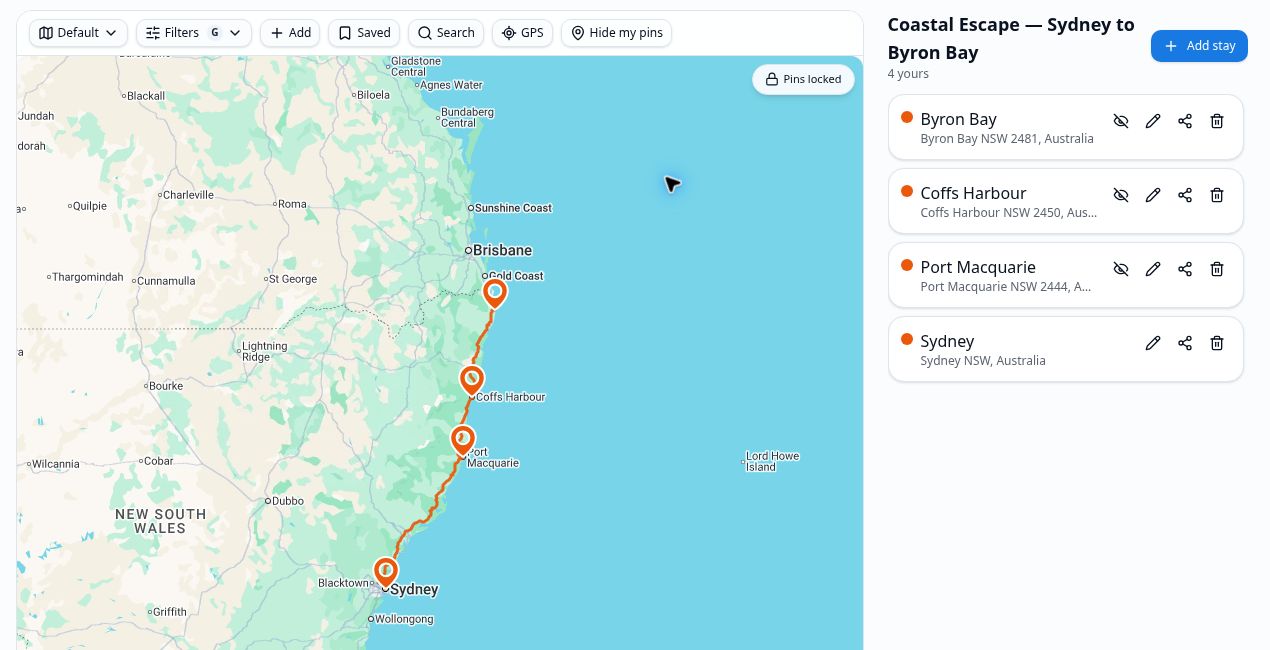
Start with the places you want to visit, then save stays or waypoints between them. The route view helps you see the shape of the journey and how far the travel legs may be.
Plans change. Update the order or add another stop without losing the trip details you have already collected.
Keep the route with your notes, budget and real expenses so the trip remains useful after you get home.
- Saved stops and stays
- Connected route legs
- Map and distance view
- Notes and dates
- Shared-trip planning
- Budget and expense connection
Frequently asked questions
Can I save several stops on one trip?+
Yes. Add stays and waypoints along the route, and keep them with the trip.
Can I change the order?+
Yes. Rearrange planned locations as the trip changes.
Can I see distances between stops?+
The route view shows connected legs and travel distance where map routing is available.
Can other people see the plan?+
Invite people to a shared trip when you want them to follow the route and plan together.
Explore Trip Tracka
Start planning your next trip
Free to start. No credit card needed.